CASE STUDY Open source · GPL-3.0
Linework: CAD drawings in a browser tab
Linework opens DXF, DWG, MicroStation DGN and PDF drawings in the browser. You can trace wiring, measure, mark up and edit, then save back to DXF or DGN, without installing anything or uploading a file. It's built with Claude Code, and the source is on GitHub.
- Formats
- 4DXF · DWG · DGN · PDF
- Uploads
- 0drawings never leave the device
- Tests
- 338276 unit · 62 end-to-end
- Startup
- 149 KBgzip, under a tested 150 KB cap
- Codebase
- 15.5klines of JS, zero dependencies
- Big drawings
- 53kentities, panning at 60 fps
- Wire trace
- <50 mson that 53k drawing, test-gated
- Works
- Offlineinstallable web app
01
Problem
Most people who open a CAD drawing aren't drafting. They need to read it: follow a wire, check a dimension, red-line a correction.
The drawings come as DGN, DWG and DXF files from desktop CAD packages that are expensive per seat and slow to install. Many online viewers work by uploading the file to someone's server, which rules them out for drawings that aren't public, and free tools that read MicroStation's DGN format are rare.
Linework's goal: open any of them in seconds, on any device, with no install and no upload, and make the everyday jobs of reading, measuring, marking up and small edits fast.
02
What it does
Four formats, one viewer
DXF R12–2018, DWG R13–2018, MicroStation DGN v7 in 2D and 3D, and PDF pages, where vector paths become real drawing items. The format is detected from the file's bytes, never its extension.
Wire tracing
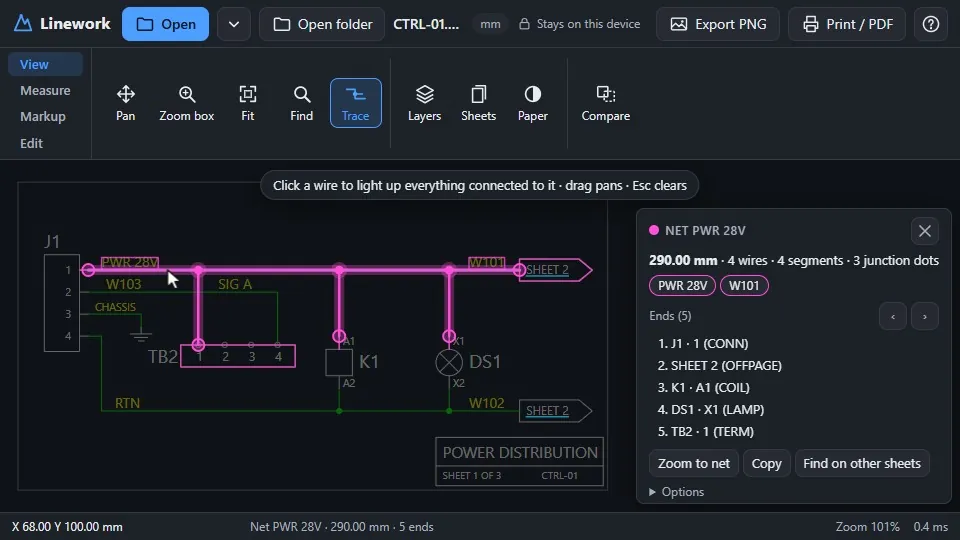
Click a wire and everything connected to it lights up. Junction dots and T-joins connect; plain crossings don't. A panel lists the net's length, its ends (the pin on each part) and its labels.
Sheet sets
Open a folder and every sheet is indexed in the background. References like "SHEET 2" become links to that sheet, and text search runs across the whole set.
Real editing
Move, rotate, reshape, retype and draw, plus find and replace, MicroStation-style key-ins (XY=, DL=, DI=, AA=), mirror, scale, array and copy and paste between drawings.
Lossless DGN saves
Everything you didn't touch stays byte-for-byte where it was, and every save is read back before it's written. More on how below.
Compare and print
Revision compare shows what changed between two versions of a drawing. Vector printing to scale, from Letter to ANSI D or A4 to A1.
Measure and mark up
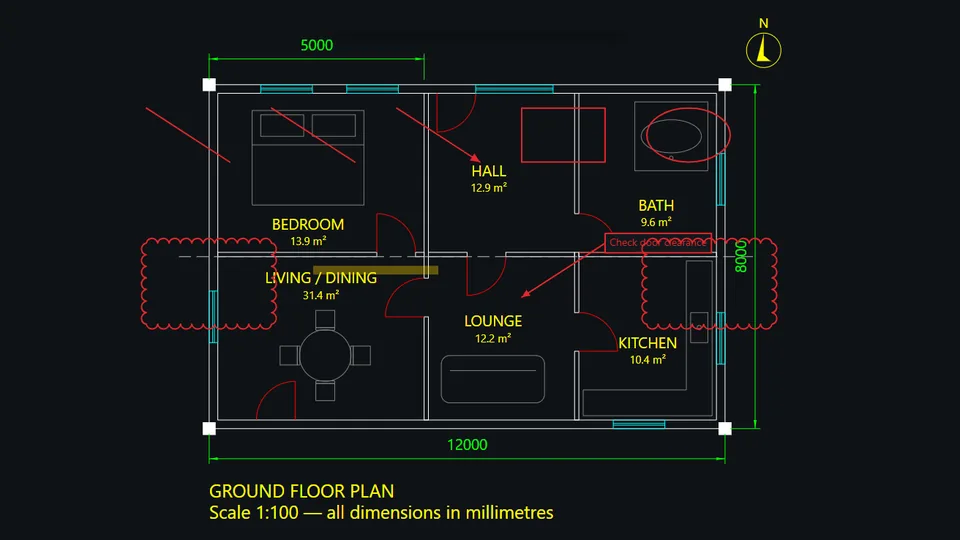
Distance, length and area with snaps. Clouds, arrows, callouts and notes are kept in a sidecar file, never written into the drawing.
Offline and private
Installable, works with no connection, and nothing is uploaded: no account, no server, no tracking.
03
Architecture
Linework is plain JavaScript modules with no framework, no build step and no runtime dependencies. The page hands each file to a Web Worker, which detects the format, parses it into one common model, expands blocks, builds a spatial index and batches the geometry for drawing. It posts the result back as transferable typed arrays, so the page never freezes while a big file loads.
Drawing is Canvas 2D. Each chunk of the drawing keeps one Path2D per style, so panning and zooming only change a transform and never rebuild geometry. Edits go into a live overlay and rebuild only the batches they touch. The DWG and PDF readers are big (2.1 MB and 0.66 MB compressed), so they load only when a file needs them, into caches that survive app updates.
04
The hard parts
Editing a DGN without rewriting it. A DGN v7 file is a stream of binary elements, and a viewer that re-encodes the whole file from what it shows on screen quietly loses everything it doesn't understand. Linework patches the original instead. An edited element gets its "deleted" bit set in place, and its new version is appended, rebuilt from its original bytes, so text node headers, linkages, graphic groups and fills survive. Untouched elements stay byte-for-byte at the same offset; a save with no edits is byte-identical, and a test proves it. Every written file is also read back by GDAL as an independent check. Coordinates that don't fit the format are refused rather than clamped, the first save writes a backup, and the new file is read back by Linework before it replaces the original.
A DWG reader you can rebuild. DWG support is LibreDWG, a GPL C library, compiled to WebAssembly in a GitHub Actions workflow from pinned sources with a pinned Emscripten toolchain. Separate runs on different machines produce the same bytes, which replaced an earlier prebuilt binary whose source couldn't be reproduced. The build turns off eval, so the strict Content Security Policy only has to allow 'wasm-unsafe-eval'. Along the way it works around LibreDWG bugs, such as a polyline call that drops the last vertex.
Staying small and fast. The code that has to load before anything appears is capped at 150 KB gzip by a test, and it's at 149 KB today, so anything new loads lazily. On a 53,100-entity drawing, loading produces no main-thread long tasks, panning holds a median 16.7 ms per frame, and building the wire-trace graph stays under a 300 ms test gate.
Proving "nothing leaves your device". The CSP only allows connections back to the app's own origin. A unit test fails if any http(s):// URL or remote fetch appears in the app or the vendored reader glue, and the end-to-end tests run under the real production CSP, including a negative control that proves the policy reaches the worker.
05
Engineering practices
Linework is built with Claude Code. The tests keep it honest: nothing ships unless both suites pass and the size budgets hold.
Node's built-in runner, no dependencies: DGN round trips, writers, the trace graph and random-edit fuzzing.
Playwright in headless Edge under the production CSP, with performance gates on a 53k-entity drawing.
Every test drawing is generated by a script. Real drawings never enter the repository.
06
Where it stands
Version 0.5.1 is live at linework.dillongreen.dev and open source under GPL-3.0 on GitHub, along with a Node entry point for using the readers outside the browser.
Known limits, stated plainly: DGN v8 isn't supported yet; DWG and PDF files can be read but are saved as DXF or DGN; and saved files are checked with GDAL but haven't yet been tested in AutoCAD or MicroStation.
All drawings shown are invented samples.